
- AI
- Strategy
- Product Development
The 80% Opportunity: AI Adoption Without the Code Obsession
Stop obsessing over AI-generated code. The real opportunity is the other 80% of engineering work: understanding, operating, learning, and verifying. Here's how we approached AI adoption at Kentico.
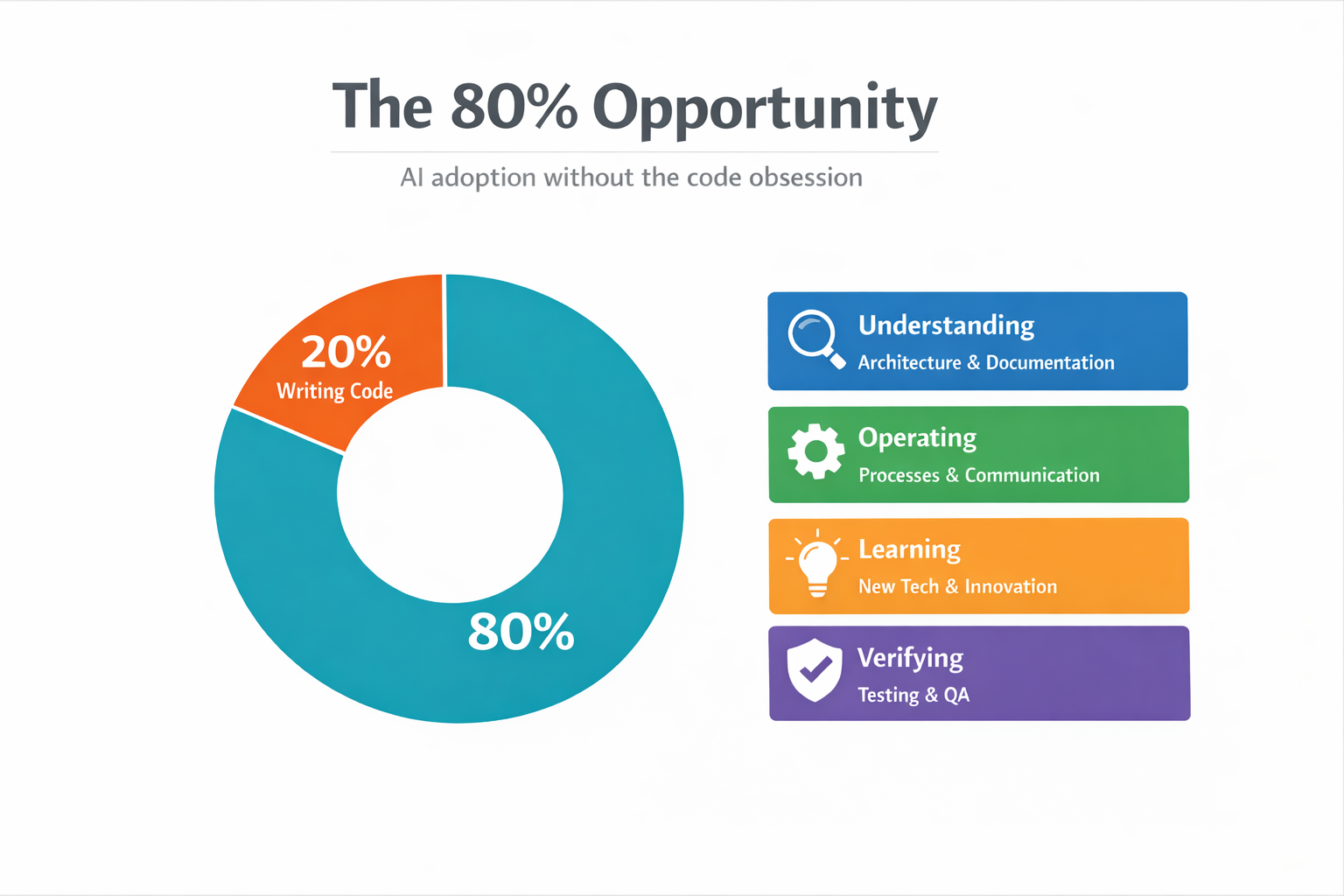
If you’re trying to make your engineering organization more AI-native, stop obsessing over “AI writes code.” The bigger win is improving the other 80% of engineering work: the understanding, operating, learning, and verifying that happens around the code. That’s where the real opportunity is, and that’s what I want to talk about.
This is a very opinionated take. It comes from my experience leading AI enablement at Kentico, a company that both uses and sells AI services. Some of this will resonate with your situation, some of it won’t. At the very least, I hope it gives you something to disagree with.
The hype, the skeptic, and the puzzle
One of the most distinctive things about AI is the amount of hype. I don’t think many people were ever hyped about APIs even when GraphQL gained a lot of traction. Same with cloud computing. There was hype, and it made things way more accessible, but it was nothing like this. The AI hype feels like marketing agencies in 2017 switching to MacBooks and calling themselves “a Mac company” combined with cloud computing actually unlocking new capabilities.
What’s challenging is that based on what role you have in whichever industry you’re in, what you hear about AI, from the hype to the downsides, can be quite different. CEOs hear one thing, developers hear another, and middle management hears something else entirely. So when your mission is to transform a company into an AI-native organization, it’s quite the puzzle.
I should probably tell you where I’m coming from, because it matters. I have a background in software architecture, I specialize in APIs, and pretty much 99% of AI tooling has some sort of JSON/RPC API hiding behind it. I’ve spent time in DevEx/DevRel roles, product management, and tech content creation. I’m usually right in the middle of the hype and the arguments online.
When Copilot came out, I immediately hopped on it. I have real issues remembering syntax between frameworks and different languages, so it was genuinely useful. But then ChatGPT came out and it seemed more like a religious awakening than a tool, and that completely put me off. So when I stepped into the AI enablement role at Kentico, I approached it as a skeptic. I don’t think AI will replace engineers. I don’t think it’s ever going to reach that point. You need the human element. You need to figure out where and why you should be using AI specific to your own company, where you can plug it into your systems, how you can evolve them, and how to improve your understanding of this new technology.
How Kentico got into this (and what we got wrong)
Since how you approach this transformation is very dependent on the organization, some context. Kentico is a digital experience platform, PaaS and SaaS. The company decided to invest heavily into AI: introducing AI features in the platform, building brand new AI services (like the AIRA Digital Assistant), and creating tools for people to interact with the platform using AI agents, like KentiCopilot. They also hired me as the dedicated AI person for R&D. From a product and company strategy perspective, everything was aligned behind AI.
That doesn’t mean everything went smoothly. Before I joined, the decision was made to roll out AI tooling to everyone immediately. The directive was simple: “Here you go, experiment with it and report back.” This caused a really interesting problem. Unlike most companies that run smaller experiments and compare between groups, we skipped that step. It was: everyone must use it, everyone must understand it, and we had no benchmarks. At the same time, AI usage was part of performance reviews, and expectations were unclear.
The result? Burnout and negative sentiment. Engineers were asking: “Why do I have to use this all of a sudden?” And the business still needed proof the investment was working, but without benchmarks, comparisons, or scoped experiments, there was nothing concrete to point to. I don’t think this was the correct approach. A heavy push without baselines can be very detrimental. It stresses timelines, inflates budgets, and creates resentment. Focused experiments really do help more than blanket mandates.
The wrong obsession
Around the same time, the broader industry was going through its own thing. Everyone is obsessing over how much code AI writes. “50% of our code is AI generated.” “Software engineers are dead.” “I spent $650 to launch a SaaS during my flight.” There’s a real obsession with telling people who spend a significant amount of their lives writing code how they should be writing code. But to me, especially on an organizational level, this is completely the wrong thing to be asking.
We never intentionally tracked or aimed for lines of code generated by AI. Before a recent talk, I checked our metrics and yeah, half of our code over a 7 day period was AI generated. Unintentionally. We never aimed for it. A lot of what AI generates for us isn’t even product code. It’s documentation, agent instructions, skills, custom Model Context Protocol (MCP) servers, prompt templates. Things that interact with and improve our product code but live alongside it. At the same time, a lot of our actual platform C# code is still human generated. And that’s fine.
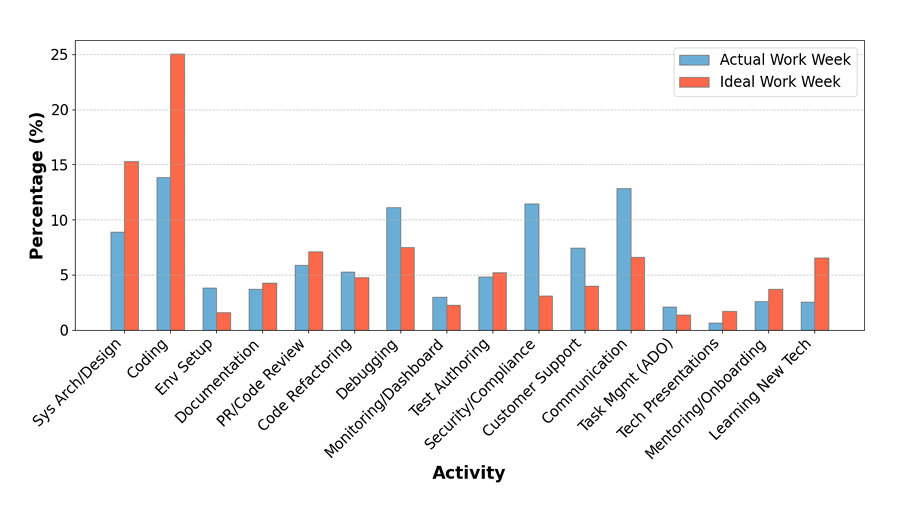
Here’s the thing: based on this DX blog covering Microsoft’s research, engineers often only spend 10-15% of their day writing code. Their ideal scenario? About 20%. So why are we obsessing over that 20%? There’s a whole opportunity in the other 80%, the part that isn’t writing code, where we can actually utilize AI effectively without caring about code quality standards or telling people how to do their jobs.
Don’t get me wrong, we still care about code. Some of the things we want to delegate to agents will obviously involve generating code, and we’re using this moment to tackle technical debt with tools like the Microsoft Modernizer. But what we’re definitely avoiding is micromanaging engineers. If someone wants to use agents to explore the codebase and then write the code themselves, great. If someone wants to go fully agentic, also great. As long as it meets our quality criteria and doesn’t delay timelines, it’s up to them.
Understanding the 80%
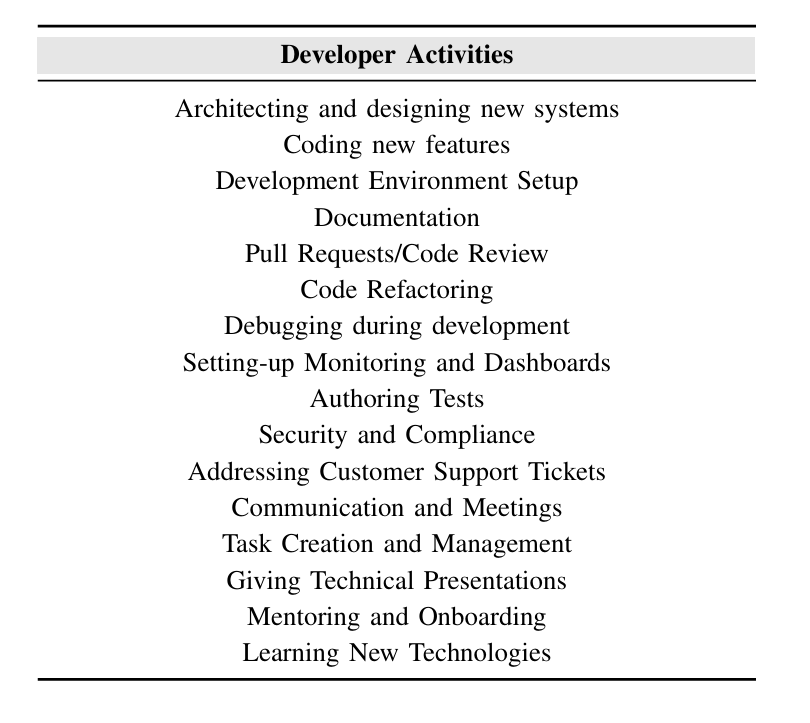
Drawing from Microsoft’s research on developer activities, we simplified the breadth of engineering work into four categories. Understanding covers solution architecture, code readability, reading documentation, keeping up with changes across the codebase. Operating is the day-to-day: moving Jira tickets, writing proposals, communication, admin work. Learning includes picking up new technologies, knowledge sharing, building POCs, innovation time. And Verifying is reviewing code, reviewing specs, testing, ensuring security standards are met.
We’re not a research center. We wanted something simple that mapped to how our engineers actually spend their time. These four buckets gave us a framework to identify where AI could help the most, without touching the code debate at all.
And this is something you’ll hear from a lot of people in the industry, and I agree: AI is not a technological challenge. The technology works. It’s a transformation puzzle. You have to sit back and take in the whole picture of your organization. Figure out what you want to achieve, how you want to achieve it, and what sacrifices you’re willing to make. Like many organizations, we had early adopters who were excited about everything, and a greater number of engineers who just wanted to do their jobs. This divide is something you juggle along with knowledge gaps, expectation gaps, leadership hype vs. engineering reality, misinformation, AI elitism, AI burnout, and constant demands about tooling and budgets. There’s a lot of balls in the air, and it’s not something you can do in isolation.
The North Star and why humans are the bottleneck
One of the things you really need to do is stop focusing on the day-to-day, your code, your tests, and define your North Star. For me, it’s simple: I want an agent to autonomously merge a pull request and deploy it into a release. Sounds easy. It’s not. Because the problem isn’t the code, it’s everything around it.
With AI agents, we can build and rebuild software fast. A week before a release used to mean panic mode. Nowadays, given enough agents and budget, you could realistically fix a feature, update a tool, or even launch something new in that timeframe. We already saw this at Kentico. During a hackathon, teams built near-production software in three days. With more time and more agent power, it would’ve been shippable.
So obsessing over how we write the code is no longer the real argument. The real constraint is humans. What you can’t change a week before release is everything around the code: marketing materials, testing processes, regression cycles, release schedules, code freezes. These are human systems meant to help humans communicate. But right now, they’re also the actual bottleneck.
Consider a typical engineering workflow: opportunity shaping, development, review, code freeze, regression testing, release. Inside development, a developer reads requirements, implements, validates, pushes a PR. A reviewer checks quality. Iteration happens. Eventually you merge. All of this exists because humans need to communicate with other humans through systems. But if an agent is building the feature, reviewing it, and acting on feedback, the traditional process starts to break down.
Traditional Workflow
AI-Assisted Workflow
It doesn’t disappear, though. The rough stages stay the same: build, validate, review, release. But the implementation changes completely. You get autonomous environments, feedback loops handled by agents, continuous iteration without friction. This is where guardrails come in. Humans shouldn’t disappear. Their role shifts. The focus becomes architecture decisions, testing processes, quality standards, defining the playgrounds agents have access to. You define the guardrails, agents operate within them, and once that loop closes, you get a self-improving system. The human’s job is to guide it.
And here’s the thing most people overlook: models will keep improving. Most companies don’t train models and don’t need to. Compare GPT-3.5 to what’s available now: night and day in both price and capabilities. So the question isn’t “how good is the model today?” but “are we ready for the models of tomorrow?” The real job of a company adopting AI isn’t about prompts, code, or which tool you use. It’s about this: can you redesign your processes to take advantage of what AI can do? Can you remove unnecessary human bottlenecks and preserve quality through systems, not manual effort?
Where we actually started: design specs
So that’s the vision. Let me show you how we’re actually doing this at Kentico.
We sat together with engineering managers, our Director of Engineering, and our VP. We discussed bottlenecks and where AI could have the biggest impact. Design specifications were the standout. During our opportunity shaping process, an engineer has to gather information from multiple repositories, check documentation, get requirements from product managers, and combine all of this into a very specific template set by our technical architects. It has to become an actionable plan that goes into a sprint. That’s a lot of documentation to assemble, a lot of things to read and understand. Requirements can be unclear, information is spread across Jira, Confluence, and code repos, and it depends on the right people being available at the right time. It’s prone to errors and not scalable.
Our thinking was straightforward: if all the information is split between repositories, Confluence, and Jira tickets, we need a way to collect it in one place. Before it even reaches the engineer, some points can be clarified. When putting a Jira ticket together, we want the PM to be able to write it in a way that makes sense based on what we already have, or at least be aware that it’s not in line with our framework. That’s a feedback step that doesn’t require an engineer. Once it leaves the PM stage, we want the engineer to quickly piece all the information together to create a spec. From there, the spec gets broken into epics and tickets. And based on the acceptance criteria in those tickets, QA can derive test plans and update regression tests.
framework?"} B -- No --> A B -- Yes --> C["👤+🤖 Engineer
assembles spec"] J["Jira"] --> C CF["Confluence"] --> C R["Code repos"] --> C C --> D["🤖 Broken into
epics/tickets"] style A fill:#bbdefb,stroke:#1976d2 style B fill:#ffcc80,stroke:#f57c00 style C fill:#e8f5e9,stroke:#388e3c style J fill:#f5f5f5,stroke:#9e9e9e style CF fill:#f5f5f5,stroke:#9e9e9e style R fill:#f5f5f5,stroke:#9e9e9e
Even from just this one part of our engineering responsibilities, we found broadly applicable use cases for AI. Full disclosure: this isn’t fully optimized yet. We’ve made the start, people are using it, and we’re iterating. But we’re already seeing engineers assemble specs faster, with some reporting it takes roughly half the time.
The boring stuff that actually matters
There are many ways to model AI adoption: J-curves, S-curves, Steve Yegge’s 8 levels. We like to keep it simple. With any tool, there are four stages: build maturity with the tool, increase confidence with the tool, increase confidence with the results, and change processes to match the new reality. By understanding where your organization’s friction points are, you deploy the same logic to every bottleneck.
But here’s what surprises people: not everything that drives AI adoption has to do with AI. A lot of very boring, low-tech things contribute towards AI performance way more than adopting the latest experimental feature. Consistent repo structure, clear ownership, standard templates. When more independent agents started coming out, we started seeing that quality engineering practices are actually very beneficial to AI performance. It’s boring. It’s also one of the most important things you can do.
One of our key moves was standardizing documentation and bringing engineering-related docs into the relevant repositories. If it applies to everything, it goes in a common repo. This has two big benefits. First, AI agents within your IDE can access all the documentation they need from within the project, so we remove the need for MCP calls, which can be expensive, slow, and fragile. I’m not a big fan of the Atlassian MCP, for many reasons. Second, documentation can be easily manipulated by agents: updated, tested against the actual code, reformatted, translated. It becomes a living part of the system. At the same time, humans can access docs from their IDE without constantly talking to an external system. This increases performance and reduces token spending quite a bit.
This is something that’s often quickly overlooked because there’s “no time or budget.” Agents can do it. Do it.
Climbing the autonomy ladder
Because I like overanalyzing things, I put together a maturity ladder for autonomy:
| Level | Stage | What it looks like | Human role |
|---|---|---|---|
| 0 | Assist | Autocomplete, chat, proposals | You do everything; AI suggests |
| 1 | Draft | Agent produces artifacts (specs, MVPs, proposals) | Human owns it; algorithms can’t be held responsible |
| 2 | Bounded execution | Agents open PRs, request reviews, act within defined boundaries | Human approves and merges |
| 3 | Centralized agents | Always-on agents in CI/CD: security scans, performance tests, automated checks | Human monitors and maintains |
| 4 | Low-risk autonomy | Public repos, specific issue types, lower-criticality work | Human sets scope and reviews outcomes |
| 5 | Broader autonomy | Autonomous builds merged into product code, passing the same quality gates as human work | Human defines guardrails and intervenes on exceptions |
We’re currently around Level 3 at Kentico. The bounded execution is done, a lot of AI-generated code can be merged, and now we’re pushing toward more autonomous workflows at scale. Thanks to our documentation and custom agents, even I can write UI tests now. I have no idea what the front end does, but I can do it. We’re building skills for logging work against tasks, security reviews, and all kinds of day-to-day operations. We even have “Agent Skill Tuesdays” because people kept sharing cool things they built.
My personal example: for internal tooling (which nobody will ever review), I’ve completely automated the review process. An orchestrator pushes code, requests a Copilot review, polls for comments, analyzes them, splits them into buckets, works on them in parallel, pushes back, requests another review, until there are zero comments. Then it merges the PR and updates everything. It works. And if we wanted to, we could use the same pattern for production code.
But that’s where the trust paradox comes in.
The trust paradox and why AI reviews aren’t simple
I ran AI-focused retros with all of our product teams. One of the top sentiments was that AI cannot be trusted. People feel less ownership over work produced with AI, and believe no process should lack human involvement. At the same time, the top request was: “We want AI code reviews. We want AI to merge code. We want to resolve more issues without human involvement.” We want more AI, but we don’t trust AI outputs. It’s another thing to juggle.
And it’s not as simple as buying CodeRabbit off the shelf, integrating it with Azure DevOps, and calling it a day. Even if you get something that does code reviews, you need to make sure the tool reliably catches real issues, respects your standards, and gets enough information to make a real decision. You need people to maintain all the context in the tooling. You need to adjust processes to allow an AI reviewer to partially replace a human. We already know that people don’t appreciate reading through pages of AI-generated content. If you just tell engineers “from now on, CodeRabbit reviews everything and you merge based on that,” a lot of people are going to be very unhappy, and they’d be right. You’d be generating massive amounts of information that can’t be processed by humans, and you’d end up with AI reviewing AI, completely removing human expertise from the process.
So we’re taking a more measured approach. We have open-source repositories, less critical tools that support the platform. Since they’re already on GitHub, we started using Copilot as a reviewer and for quickly addressing simple issues. The plan is to introduce AI-assisted reviews for teams working on our public integration repos. They’re simpler in nature, the volume and criticality is lower, and it’s also something our customers would interact with using agents, so it’s a good testing ground. We’re timeboxing this at three to six months, getting feedback from developers, partners, and solution architects. Based on the outcomes, we’ll expand to bug fixes next. Scopes tend to be very specific. AI can research the solution, and we can build a closed loop: bug reported, Jira ticket created, agent investigates, implementation agent builds the fix, another agent reviews it, and if everything passes, it merges.
The boring-but-critical topic: metrics and budgets
This might be the most boring part, but it’s one of the most important. Without metrics, you can’t prove to the business that any of this is working, and you can’t get budget for more.
The problem is there’s a lot of vanity metrics out there and everything seems to be “+20%.” I’ve been comparing our numbers to industry benchmarks and we’ve hit them: 20% throughput increase within four months, cycle time reductions, December being our most productive December ever, 95% pipeline success rate. It’s genuinely great. But a lot of AI metrics are imperfect and there’s no clean way to measure impact without being intrusive. All you really get is data from your tools, source control, and project management systems. You need to figure out what matters for your situation and get creative with what’s available.
We started simple: lines of code generated by AI and weekly active users. We quickly sunsetted the LOC metric (once people start using AI tooling, lines of code are the easiest thing to generate, it tells you nothing). We kept WAU and hit 100% active weekly users about two and a half months in. From there we evolved to median PRs per engineer per month, PR sizes and cycle times, AI-assisted PRs, an AI assets and workflows registry (so we know what people are actually building and sharing), R&D surveys for qualitative data on how people actually feel, and token and capacity usage.
And here’s the thing: your metrics are directly tied to your budgets. AI tooling is very powerful and also extremely expensive at scale. The difference between every engineer at Kentico getting basic Claude access versus Claude Max is significant. Based on data from DX, a lot of companies are spending less on AI than they seem to promote. Their top 20% had a spend of over $500 per engineer per year, which isn’t even a Copilot Enterprise license for the year. Take these numbers with a grain of salt, understand your actual costs versus returns, and maintain flexibility. If you can’t show what you’re getting out of the investment, you’re not going to keep getting funded.
Three takeaways
1. Chase the 80%. Focus on how your organization can change to accommodate the new technology and where you can extract value, without messing with how your engineers, writers, and designers do their work. Think about the repetitive, costly processes and where you can free people to focus on higher-value items.
2. Focused experiments beat mandates. Set boundaries for your experiments. Find ways to determine if something is working for your organization specifically. Don’t try to scale it across everyone immediately.
3. Adoption is a multi-step process. Build the guardrails. Build the good engineering practices and processes. Build those defense mechanisms against slop. Then you can worry more about code generation and how that works. You’re not going to get from zero to full autonomy overnight. It’s still software engineering underneath, just much faster.
If you want to continue the conversation, you can find me on LinkedIn. I’m genuinely passionate about this stuff and always happy to chat.